How to Hack Assault Cube – Beginner’s Guide to Game Hacking (Part 1)
Author: Alcidius
August 20, 2025
Have you ever played a shooter game and wondered how some opponents seem to land every shot with lightning-fast reactions? Chances are, you’ve run into an aimbot. An aimbot is a cheat program that automatically locks a player’s crosshair onto enemies, giving them an unfair advantage. While many gamers report suspicious players to admins, the technical side of how aimbots actually work, is rarely discussed in detail.
What is aimbot exactly?
An aimbot is a type of cheat software that automatically handles aiming for the player. Instead of manually moving the mouse to line up a shot, the aimbot reads the enemy’s position data directly from the game’s memory and adjusts the player’s aim instantly.
This gives the user nearly perfect accuracy and reaction times that are far beyond human ability. In other words, the aimbot turns aiming into an automated process, making it one of the most recognizable and most controversial cheats in online shooter games.
Disclaimer
This post is provided for educational purposes only. The techniques discussed, including reverse engineering and memory analysis in Assault Cube, are intended to help readers understand how games work at a low level and to develop skills in programming, debugging, and software analysis.
I do not encourage or condone cheating in online games or using these methods in ways that disrupt fair play, violate terms of service, or harm other players. Applying these techniques in competitive or multiplayer environments may result in account bans, legal action, or other consequences.
Reverse engineering
When creating cheats like an aimbot in Assault Cube, the first step is usually reverse engineering. Reverse engineering is the process of analyzing how a game stores and updates its data in memory.
Every player in the game, whether it’s you, a teammate, or an enemy has a set of values that describe their state. These include:
- Position (coordinates in the game world);
- Orientation (which way they’re facing);
- Health (current hit points);
- Team affiliation (friend or foe).
All of this information is stored in memory as part of a player entity structure. By locating and mapping these memory structures, cheat developers can figure out the offsets. These are the exact locations of useful values like health or coordinates. These offsets form the foundation for any kind of game hack, including aimbots.
Tools used
To build an aimbot in Assault Cube you’ll need a few essential reverse engineering and development tools. Here are the ones we’ll be using throughout this tutorial:
- Cheat Engine: Used to determine the offsets and pointers to certain variables;
- Reclass: Used to determine the data structures of certain entities;
- Visual Studio: Used to write the cheat software.
If you want to follow along, I highly recommend installing these tools. For this blog I use Assault Cube Version 1.3.0.2. If you’re using a different version, don’t worry, you can still follow along. Just keep in mind that memory offsets change between versions, so your values will differ from the ones shown here.
Finding the Player Health
One of the easiest values to locate in Assault Cube is the player’s health. Every time you spawn, your health always begins at 100, making it the perfect starting point for memory scanning.
Let's launch the game, open Cheat Engine, and attach Cheat Engine to the ac_client.exe process (that’s the game’s executable). With everything set up, start a singleplayer game match and scan for the value 100.
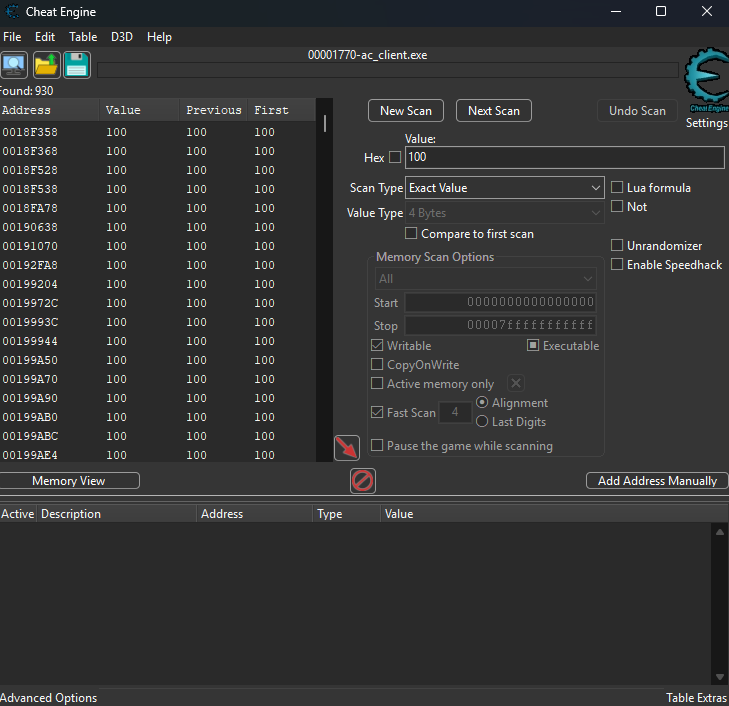 Cheat Engine will return a massive list of results. To narrow it down, we need the value to change. The easiest way to do this is to toss a grenade at your feet or let an enemy shoot you. In my case, my health dropped to
 31.
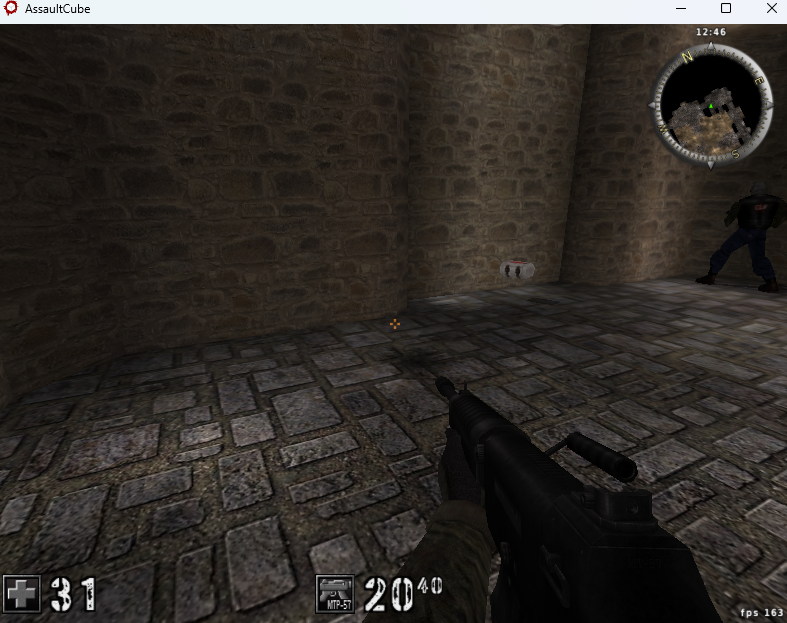 Now scan again, this time for
 31.
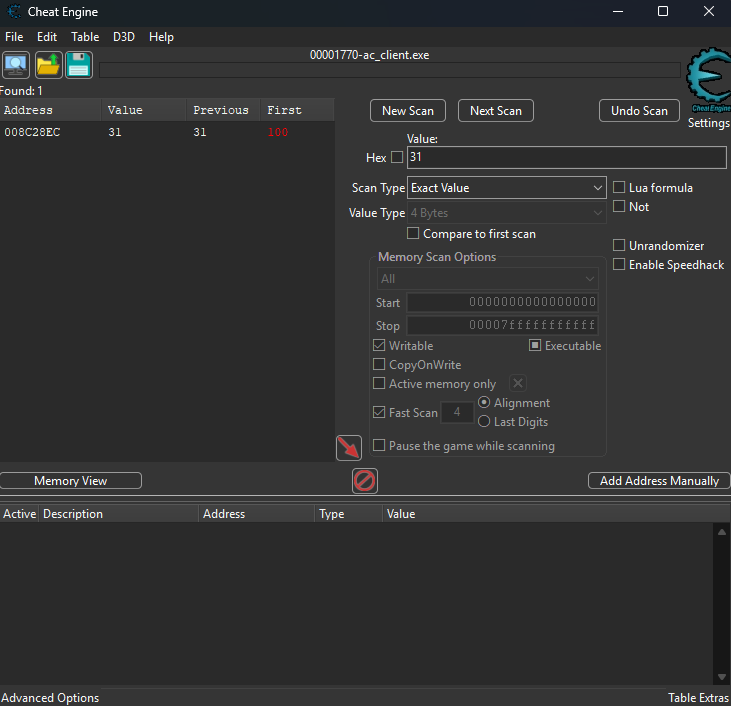 This time, only one address remains. That’s where the game is storing our health in memory. We'll use this method and methods alike to hunt down other parameters as well. Let's rename this parameter to Player Health for clarity.
But here’s the problem: that memory address won’t stay the same forever. Restart the game, and it shifts somewhere else. What we really need is a pointer, this is a stable reference that always leads back to our health value, no matter where it moves.
To find one, right-click your health entry and choose Pointer scan for this address.
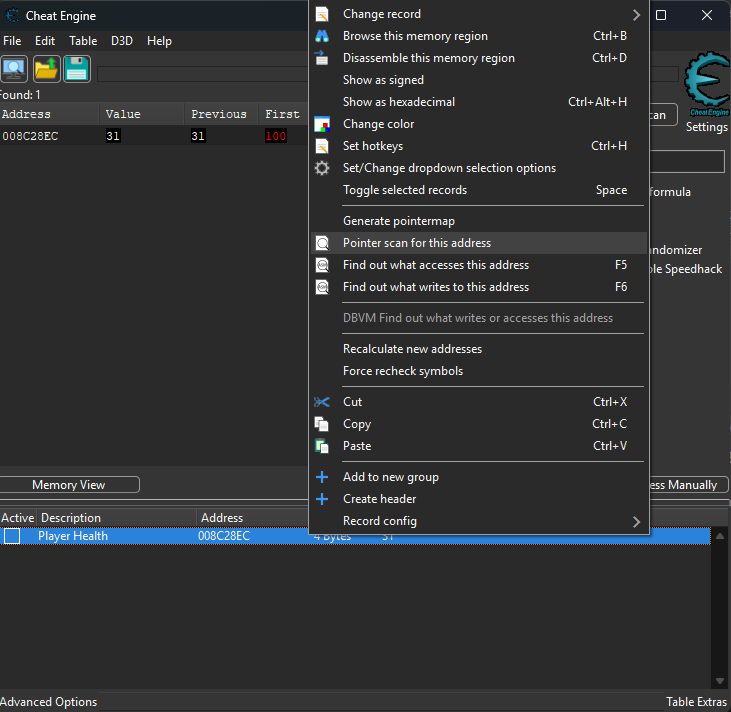 Set the max level to
 1 and hit OK.
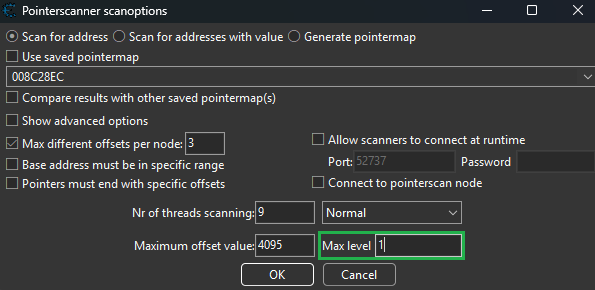 Cheat Engine will now show a long list of results. The ones starting with
 "ac_client.exe" are the ones we care about most, because they live inside the game’s main module. These offsets will eventually guide us back to the local player pointer that represents the entire player object.
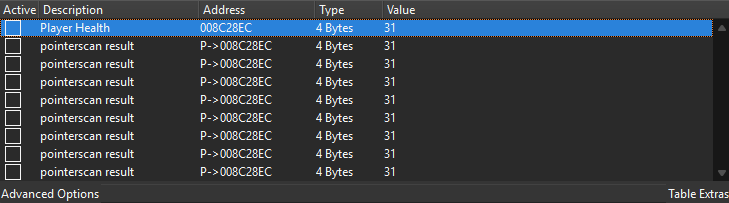 At this point, we’ve found where the game keeps our health, and we’ve identified reliable pointers that can take us back to it even after a restart. The next step is to follow these pointers upstream and track down the local player pointer candidates.
Finding the local player pointer candidates
Up to this point, we’ve been following pointers that lead directly to the health value. That’s useful, but our real objective is to locate the local player pointer. This is the base structure that represents the player object. This is crucial, since it holds not just health, but also position, view angles, and other key properties we’ll need for building our aimbot.
To get there, we identify what accesses the health pointer address by right clicking on one of the pointerscan results. Next we'll choose “Find out what accesses this address”.
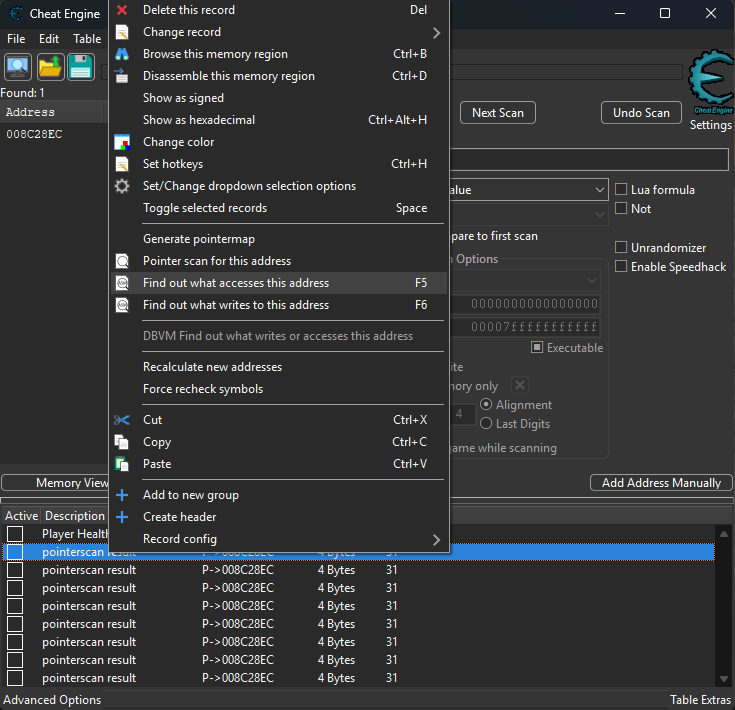 Select the second option in the prompt.
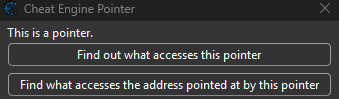 To generate activity, we need the game to touch the health value again. Taking more damage works, in my case, I dropped from
 31 to 14.
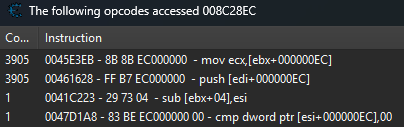 Cheat engine now shows some assembly instructions. From the screenshot we can take away three things:
ebxis holding the local player pointer;EC(in hex) is the offset between that pointer and the health value;- the calculation
ebx + ECends up inecx. Clicking on the instruction lets us see the value inebx, which at this moment is008C2800. That’s the runtime address of the local player.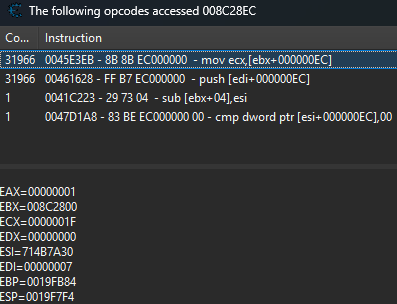 Knowing the offset (
EC), we can strip it from the earlier pointer results and replace it with00. This leaves us with candidate addresses for the player pointer. Switching Cheat Engine’s display to hex makes them easier to read.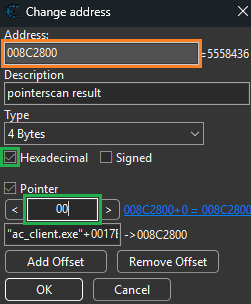 After cleaning things up, the table looked like this:
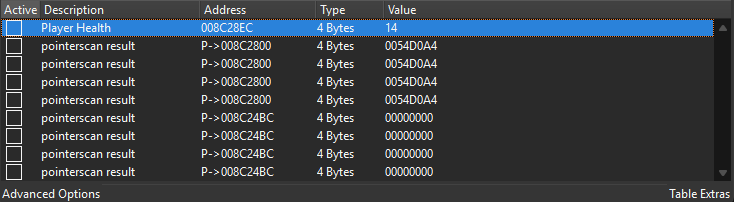 From here we can note down the four most relevant candidates:
 "ac_client.exe"+0017E0A8;"ac_client.exe"+0017E254;"ac_client.exe"+0018AC00;"ac_client.exe"+00195404. The key things we’ve learned so far:- The runtime local player address was
008C2800. - The health offset is always
EC. With this information we can now go hunting for the entity list and figure out which of these candidates is the true local player pointer.Finding the entity list
With candidate pointers for the local player identified, our next task is to find the entity list, this is the structure that stores data for all players and bots in Assault Cube. Typically, the local player pointer and the entity list are located close to each other in memory, so we can uncover it by examining another entity’s health.
We begin with a simple assumption: enemies start with 100 health. So, we scan for that value. After damaging an enemy, we filter the results with “decreased value” until we’re left with a single candidate.
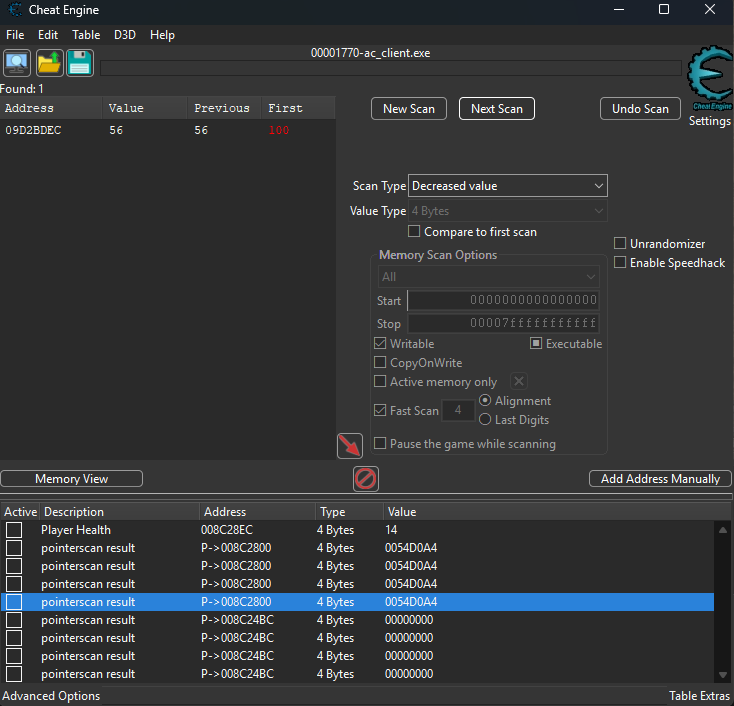 Adding this address to the table lets us repeat the same process we used earlier on our own health. What we’re really looking for is whether this entity’s health pointer sits near any of the player pointers we identified before:
"ac_client.exe"+0017E0A8;"ac_client.exe"+0017E254;"ac_client.exe"+0018AC00;"ac_client.exe"+00195404.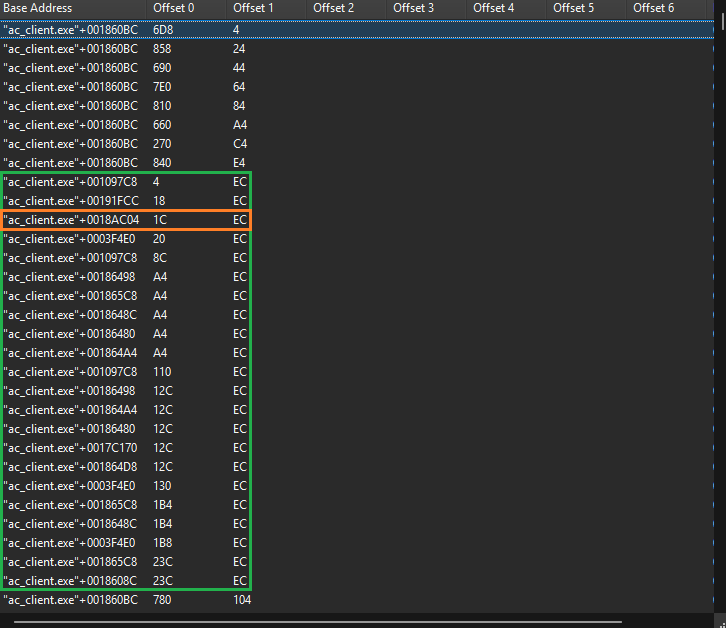 Sorting by
 offset 6makes the relationship obvious. The pointer at"ac_client.exe"+0018AC04is right next to"ac_client.exe"+0018AC00, which is in our list of potential pointers that point to the player's address. From this, we can safely conclude:- The local player pointer is
"ac_client.exe"+0018C00; - The entity list begins at
"ac_client.exe"+0018C04.Why This Matters
The entity list is one of the most valuable discoveries in game hacking. It allows you to access information about every active character in the game (not just your own). This is the backbone for features like:
- Aimbots (finding targets);
- ESP/wallhacks (displaying enemy positions);
- Player stat manipulation.
Find the player count
The next step is to locate the value that tracks how many bots or players are currently in the game. Importantly, the local player is not included in this count.
Start with a game of two players. Since the game only tracks other entities, the value we’re looking for is 1.
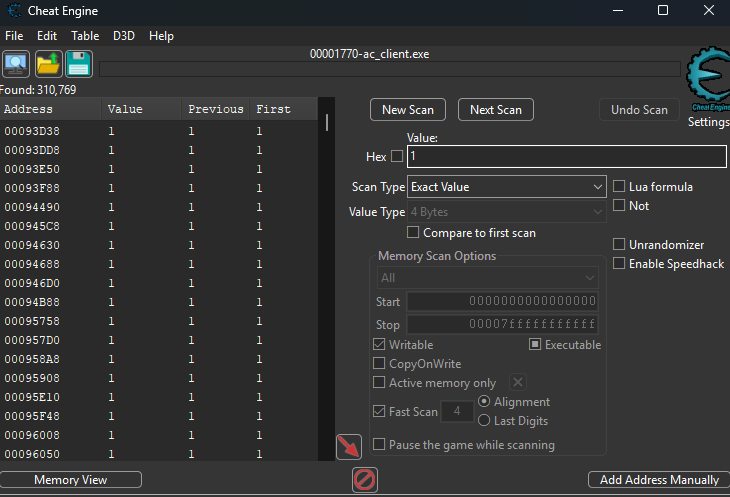 Next, launch a match with twelve players. The target value should now be
 11. Repeating this process across different matches narrowed the results until only a single candidate remained.
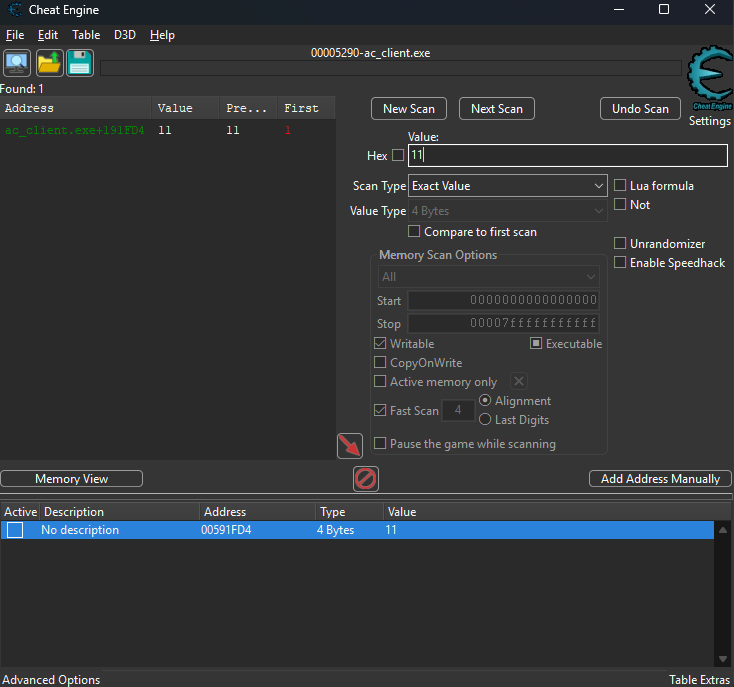 This turned out to already be a pointer. The offset that represents the entity list size is stored at
 "ac_client.exe"+191FD4.
Reclass the player
Now that we've identified the local player pointer, we can dive deeper into the actual player object structure using ReClass x86. Since Assault Cube is a 32-bit game, the x86 version of ReClass is the correct choice.
Launch ReClass and attach it to the ac_client.exe process. Then point it at the local player address:
[<ac_client.exe>+0018AC00]
The square brackets dereference the address, allowing us to see the contents of the player object rather than just its pointer.
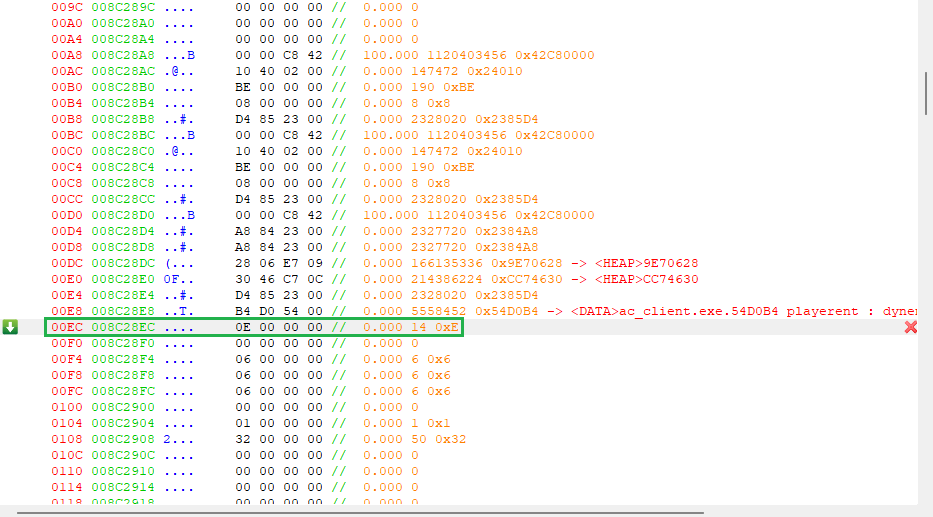
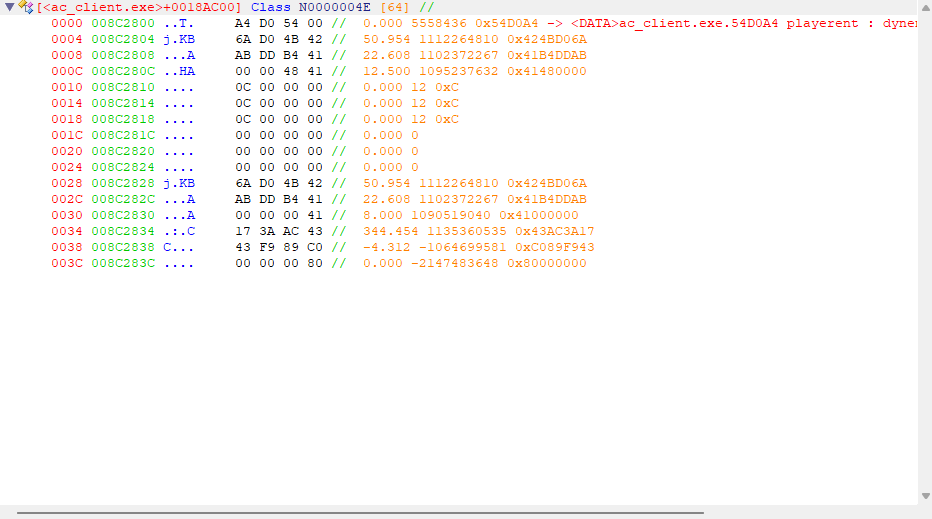 Expanding the view by about 1024 bytes reveals a chunk of memory filled with data fields. To verify we’re looking at the right structure, we can scroll down to offset
 EC and check that the value there matches the player’s current health.
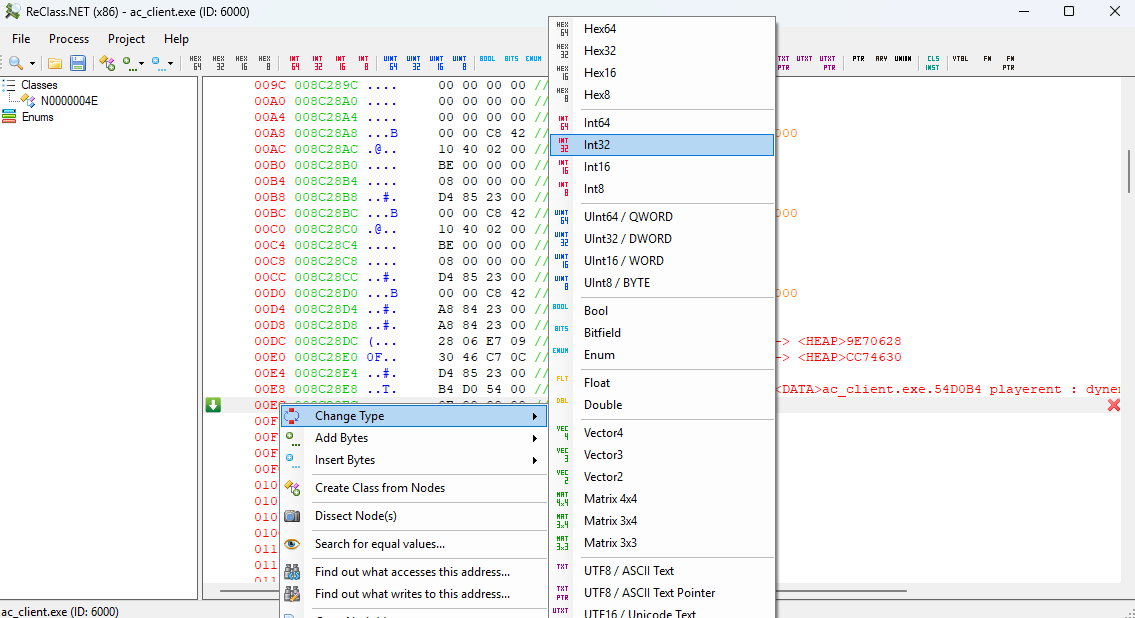
 Changing the type to
 int32 makes the value easier to read, and renaming it to Player Health gives us a clear reference point.
 From here, exploring the structure is mostly a matter of experimenting and moving around in the game and watching which memory values update. This reveals some of the most useful fields for building an aimbot:
- Head coordinates at offset
0x0004; - View angles at offset
0x0034and0x0038.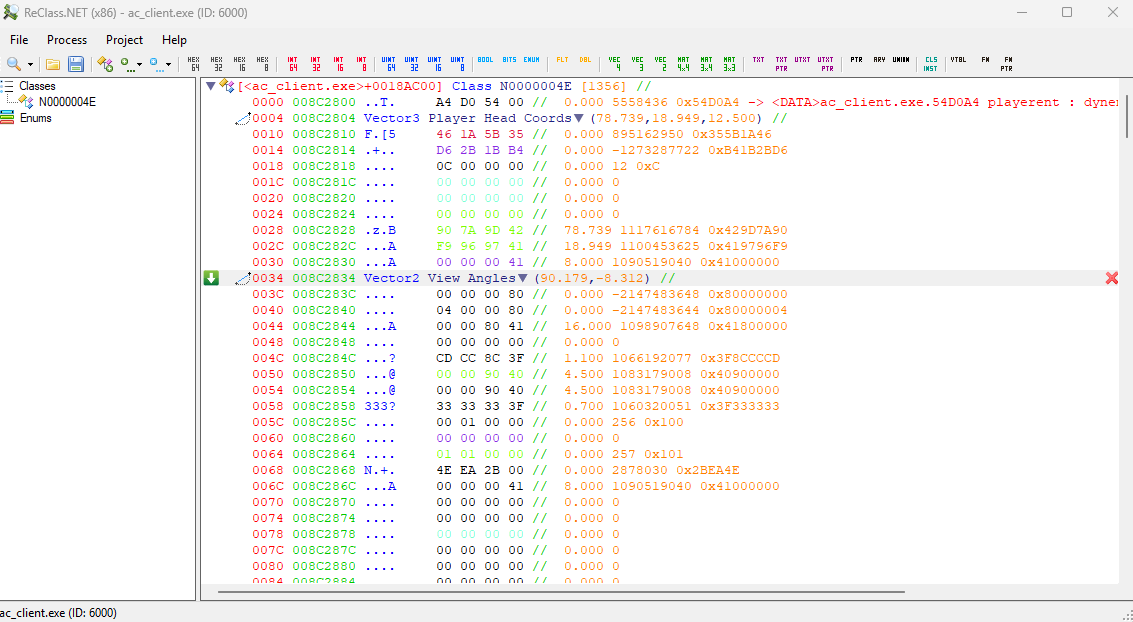 With the head position and view angles mapped out, we now have everything needed to interact with the player object and build the aimbot logic.
Conclusion
In this guide, we explored the core memory structures of Assault Cube and learned how to uncover the critical offsets that drive the game. By tracing health values, locating the local player pointer, mapping the entity list, and identifying view angles, we built the foundation of game hacking.
Here are the key offsets discovered in this tutorial:
- Local player object:
"ac_client.exe"+0018AC00 - Entity list:
"ac_client.exe"+0018AC04 - Entity count:
"ac_client.exe"+191FD4 - Head coordinates offset:
0x0004 - View angles:
0x0034,0x0038
With these values, you can experiment directly in Cheat Engine or take the next step and use them in custom code. This knowledge doesn’t just apply to Assault Cube, it introduces you to the general workflow of game hacking:
- Reverse engineer memory structures.
- Identify stable pointers.
- Map out useful offsets.
- Apply them to automate gameplay features (like an aimbot).
In the next chapter, we’ll put these offsets into action and begin writing an aimbot for Assault Cube that can automatically lock onto targets.